
Tips for Creating a Cozy and Inviting Home Office Space
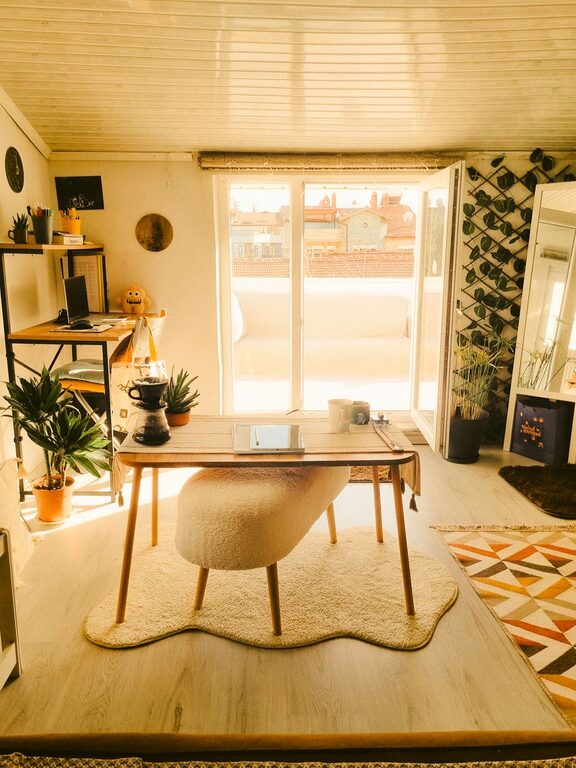
Creating a cozy and inviting home office is more important than ever. Whether you work remotely, run a side business, or simply need a quiet corner for tasks, a well-designed workspace can enhance your focus and creativity. Here are some practical tips to help you build a home office that’s both comfortable and functional.
Choose the Right Location
The first step in crafting your home office is finding the best spot. Ideally, select a quiet area with minimal distractions and enough space for your work essentials.
– Natural Light: Pick a space near a window, if possible. Natural light reduces eye strain and elevates mood.
– Privacy: If your home is busy, consider a room with a door or a nook where you can concentrate.
– Accessibility: Make sure your office is easily accessible to avoid unnecessary disruptions during breaks or calls.
Invest in Comfortable Furniture
Comfort is key when you spend long hours at your desk. Quality furniture supports your health and productivity.
– Ergonomic Chair: Choose a chair that provides good lumbar support and adjustable height.
– Functional Desk: Select a desk that suits your work style — whether you prefer minimal clutter or need space for multiple monitors.
– Additional Seating: Consider a small chair or cushioned bench for reading or brainstorming away from your desk.
Personalize Your Space
A personalized office feels welcoming and encourages you to spend time there.
– Color Scheme: Use soothing colors like soft blues, greens, or neutral tones that promote calmness.
– Decor Items: Add items that inspire you, such as artwork, plants, or motivational quotes.
– Organizers: Stylish storage boxes, shelves, and trays keep your desk tidy while adding personality.
Optimize Lighting
Proper lighting supports productivity and prevents eye strain.
– Task Lighting: Use a desk lamp with adjustable brightness for focused work.
– Ambient Lighting: Soft overhead lighting or floor lamps create a cozy atmosphere for the entire room.
– Window Treatments: Install blinds or curtains that allow you to control natural light throughout the day.
Manage Cable Clutter
Messy cables can distract you and make your space look untidy.
– Cable Organizers: Use clips, sleeves, or under-desk trays to keep cords hidden and organized.
– Wireless Devices: Whenever possible, opt for wireless keyboards, mice, and headphones.
– Power Placement: Position power strips within reach but out of sight to reduce clutter.
Incorporate Greenery
Plants not only enhance air quality but also add life and color to your office.
– Easy-Care Plants: Choose low-maintenance options like succulents, snake plants, or pothos.
– Placement: Position plants on shelves, your desk, or near windows for natural light.
– Benefits: Studies show that greenery can reduce stress and boost creativity.
Maintain Cleanliness and Organization
An organized workspace helps keep your mind clear and your projects on track.
– Daily Tidying: Spend a few minutes at the end of each day to clear your desk and file papers.
– Storage Solutions: Use drawers, filing cabinets, or wall organizers to store documents and supplies.
– Minimal Clutter: Keep only essential items on your desk to maintain focus.
Add Comfort and Warmth
Small touches can make your office feel cozy and inviting.
– Textiles: Include a soft rug, cushions, or a throw blanket to add warmth.
– Scent: Use candles or essential oil diffusers for a pleasant aroma without overpowering your space.
– Sound: Consider a white noise machine or soft background music to maintain concentration.
Set Boundaries for Work and Relaxation
Especially when working from home, it’s important to separate work time from personal time.
– Designated Space: Use your home office exclusively for work, avoiding other activities like watching TV.
– Routine: Establish clear work hours and breaks to enhance productivity.
– Visual Cues: Closing the door or using a screen divider can signal the start and end of the workday.
Technology Essentials
Ensure your technology supports your work without causing frustration.
– Reliable Internet: A strong and stable internet connection is crucial.
– Tech Setup: Organize equipment like monitors, printers, and chargers ergonomically.
– Backup Solutions: Use cloud storage or external hard drives to protect important files.
—
Creating a cozy and inviting home office takes some effort, but the results are well worth it. By prioritizing comfort, organization, and personalization, you’ll build a space where work feels less like a chore and more like a rewarding experience. Remember, your home office should be a reflection of you — a place where productivity and peace coexist.